Sorting — sorted(), .sort(), and the key function
Python doesn't sort by writing a comparison function for every case — one key function per sort, describing what to sort BY, covers nearly everything from a single field to a multi-level tiebreak.
Beginner
4 min read
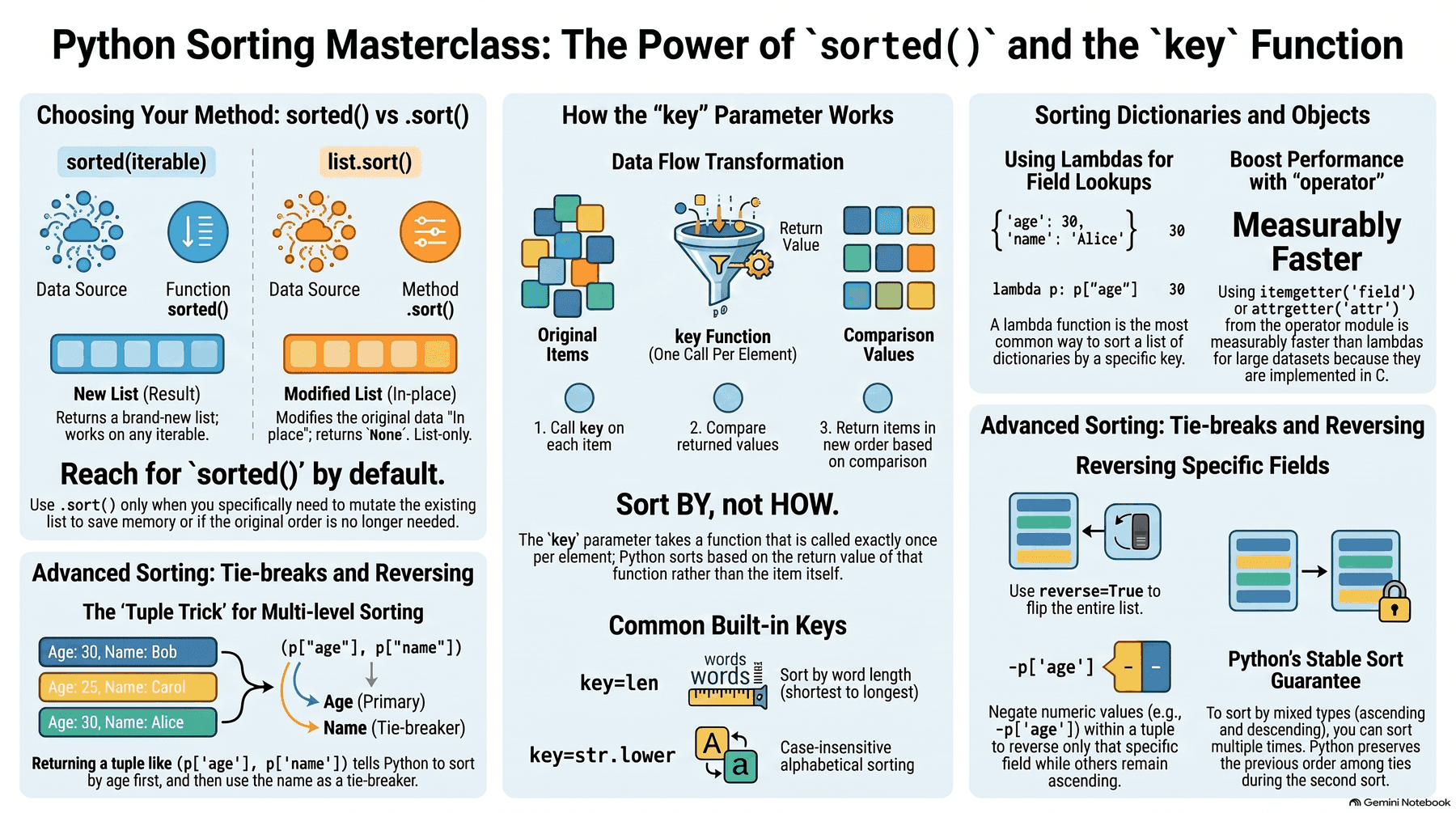
sorted() vs .sort(): a new list, or sort in place
numbers = [4, 1, 3, 2]

sorted(numbers)   # [1, 2, 3, 4] — returns a NEW list, numbers is untouched
numbers            # [4, 1, 3, 2] — unchanged

numbers.sort()      # sorts numbers IN PLACE, returns None
numbers # [1, 2, 3, 4] — now changedsorted() is a built-in function that works on any iterable (a list, tuple, or generator) and always returns a new list, leaving the original untouched. .sort() is a method that only exists on lists, sorts in place, and returns None — printing numbers.sort() directly prints None, a common first mistake. Reach for sorted() by default; reach for .sort() specifically when mutating the existing list in place is actually the intent (and memory matters enough to avoid a copy).
key: what to sort BY, not how to compare
words = ["banana", "fig", "apple", "kiwi"]

sorted(words, key=len)               # ['fig', 'kiwi', 'apple', 'banana'] — shortest to longest
sorted(words, key=str.lower)          # case-insensitive alphabetical order
sorted(words, key=len, reverse=True) # longest to shortestkey takes a function, called once per element, and Python sorts by the function's return value instead of the element itself — key=len sorts by each word's length, key=str.lower sorts case-insensitively without actually changing any word's case in the output. This is the single mechanism behind nearly every custom sort — there's no separate "comparator function" API to learn, unlike languages that require writing a full compare(a, b) function for anything beyond default ordering.
Sorting objects and dicts: key with a lambda or attrgetter
people = [{"name": "Ada", "age": 36}, {"name": "Kai", "age": 24}]

sorted(people, key=lambda p: p["age"])          # sort dicts by the "age" value

from operator import itemgetter, attrgetter
sorted(people, key=itemgetter("age"))            # same result, slightly faster — no Python-level call overhead
sorted(people, key=attrgetter("age")) # the object-attribute equivalent, for p.age instead of p["age"]A lambda is the most common way to write a one-off key — lambda p: p["age"] means "sort by this dict's age value." operator.itemgetter/attrgetter do the exact same job as their lambda equivalents but are implemented in C, making them measurably faster for large datasets, and are the idiomatic choice when the key is a simple field lookup rather than a computed expression.
Sorting by multiple criteria: a tuple key
people = [{"name": "Kai", "age": 24}, {"name": "Ada", "age": 24}, {"name": "Ana", "age": 19}]

sorted(people, key=lambda p: (p["age"], p["name"]))
# sorted by age first; for equal ages, "Ada" sorts before "Kai" as the tiebreakReturning a tuple from the key function sorts by the tuple's elements in order — Python compares tuples element by element, exactly like comparing multi-column values in a database ORDER BY. This is the standard way to express "sort by A, and for ties, sort by B" without writing custom comparison logic — (p["age"], p["name"]) sorts by age first, then alphabetically by name only among people who share the same age.
Reversing just one field: negate, don't just flip reverse=True
# Age ascending, but name DESCENDING as the tiebreak — reverse=True on the
# whole sort would flip BOTH fields, which isn't what's wanted here
sorted(people, key=lambda p: (p["age"], p["name"]), reverse=True)  # WRONG — flips both

# RIGHT: negate the numeric field directly to reverse just that one
sorted(people, key=lambda p: (p["age"], [-ord(c) for c in p["name"]])) # clunkyreverse=True flips the entire sort, every field in the tuple — it can't reverse just one field of a multi-field sort. For a numeric field, negating it (-p["age"]) reverses just that field while leaving the rest ascending; for a string field, this trick doesn't apply directly (strings can't be negated), which is why mixed ascending/descending multi-field sorts on non-numeric fields usually need sorted() called twice, using Python's stable sort guarantee: sorting by the secondary key first, then re-sorting by the primary key, preserves the secondary order among ties.
Further reading
Check your understanding
A quick comprehension check — not tracked, not graded, just for you.
1. What's the key difference between sorted() and list.sort()?
2. What does sorted(words, key=len) actually sort by?
3. What does sorted(people, key=lambda p: (p['age'], p['name'])) do?
4. Why reach for operator.itemgetter instead of an equivalent lambda?
Checking your account…
Python